



Technical SEO is the layer of work that decides whether search engines can reach, read and trust your website at all. Marketing teams often skip it, because it looks like a developer topic. However, a slow or poorly structured site quietly caps every other channel you fund. As a result, your content, your ads and your landing pages all underperform, and the cause stays invisible on the dashboard.
This guide explains technical SEO for business websites in plain language. So a marketing lead can run the checks first, then brief a developer properly. We cover what the discipline includes, four practical steps, a quarterly checklist, and the mistakes we see most often on European SME sites.
What Technical SEO Actually Covers
Technical SEO covers everything that happens before a search engine reads your words. Therefore it sits underneath content and link building, rather than beside them.
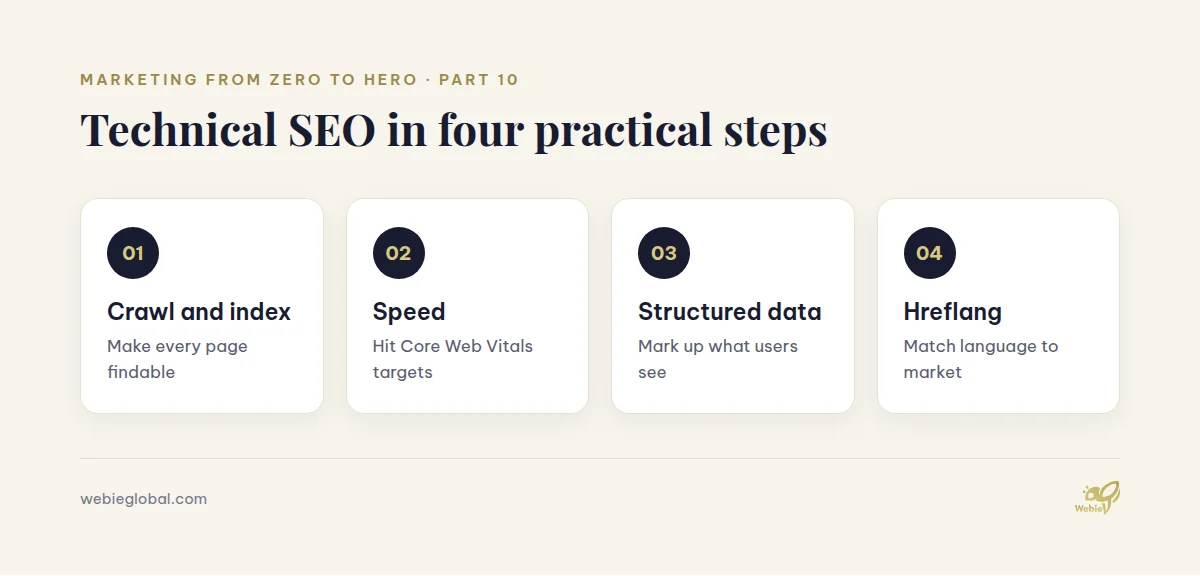
In practice, the work falls into four groups:
- Crawling and indexing. Search engines must find your pages first, then keep them in the index.
- Speed and stability. Slow pages lose visitors, so Google treats the experience as a ranking input.
- Structure and markup. Clear URLs, headings and schema help machines understand each page.
- Internationalisation. Multi-language sites need signals that show which version suits which market.
None of this replaces good content. Instead, it removes the friction that stops good content from ranking. For example, a brilliant service page earns nothing while a stray directive keeps it out of the index.
Why Technical SEO Matters for European SMEs
Most SME websites carry between 30 and 300 pages. At that size, technical SEO problems rarely announce themselves. Rankings simply drift, and nobody links the drift to a template change from six months earlier.
There is a budget argument too. Paid traffic stops the day you pause the spend, whereas a technically sound site keeps earning. Because fixes are usually one-off engineering tasks, the cost profile suits a lean team. We covered that trade-off in marketing budget planning for SMEs.
Finally, European buyers research in long cycles. They compare vendors across several sessions and devices. So every broken page or slow load costs you a touchpoint you had already paid to create.
Step 1: Make Your Site Crawlable and Indexable
Start here, because nothing else matters while pages stay invisible.
First, open Google Search Console and read the Pages report. It lists every URL Google knows, together with the reason it stayed out of the index. Then compare that list with your sitemap.
An XML sitemap helps search engines crawl efficiently. Google recommends one when a site runs beyond 500 pages, or when it launches with few external links (Google Search Central). Smaller sites with solid internal linking often manage without one. Still, most CMS platforms generate a sitemap automatically, so there is little reason to skip it.
Next, check your robots.txt file and your meta robots tags. A single noindex left over from a staging build can hide an entire section. Similarly, a blocked directory in robots.txt stops crawlers reading the CSS your layout depends on.
Finally, tidy your redirects. Chains of three or four hops waste crawl budget and slow real visitors. Instead, point every old URL straight at its final destination.
Step 2: Fix Core Web Vitals and Page Speed
Core Web Vitals measure how a page feels to a real person. Google publishes three metrics, each with a clear target at the 75th percentile of loads (web.dev):
- Largest Contentful Paint (LCP): 2.5 seconds or less.
- Interaction to Next Paint (INP): 200 milliseconds or less.
- Cumulative Layout Shift (CLS): 0.1 or less.
Most SME sites fail on LCP first. Usually the culprit is an oversized hero image, an uncompressed video, or a render-blocking script from a marketing tool.
Therefore, start with the cheap wins. Serve images in WebP or AVIF, size them for the container, and load anything below the fold lazily. Then audit your tag manager. Every extra pixel you add costs milliseconds, so review the list whenever you change your marketing tech stack.
CLS deserves special attention on B2B sites. Cookie banners, sticky headers and late-loading fonts all shift the layout while someone reads. Because consent banners are unavoidable in Europe, reserve their space in the layout rather than injecting them afterwards.
Step 3: Get Structured Data Right
Structured data tells search engines what a page represents, instead of leaving them to guess. It also feeds the answer boxes and AI summaries that increasingly sit above the classic blue links.
For a business website, four schema types cover most needs:
- Organization on the homepage, with your legal name, logo and profiles.
- LocalBusiness when you serve customers from a physical address.
- Service or Product on each commercial page.
- FAQPage on pages that genuinely answer questions.
Mark up only what a visitor can actually see. Otherwise you risk a manual action, and the effort backfires. After publishing, validate each template with Google’s Rich Results Test, then re-check after any redesign.
Step 4: Handle Multi-Language and Multi-Country Sites
European businesses rarely stay in one language for long. Once you add a second version, hreflang annotations become essential. They tell Google which page suits which audience, so a German buyer lands on the German page rather than the English one.
Three rules keep hreflang stable:
- Every version must reference every other version, including itself.
- Use language codes alone when you target a language, and language-region pairs when you target a market.
- Add an
x-defaultversion for visitors your set does not cover.
Also decide your URL structure early, because changing it later is expensive. Subdirectories such as /de/ are simplest for SMEs, since they inherit the authority of one domain. Subdomains and country domains both split that authority, so they suit larger organisations with local teams.
A Quarterly Technical SEO Checklist
Run the same short list every quarter. Consequently you catch regressions before they compound, and the review takes under two hours.
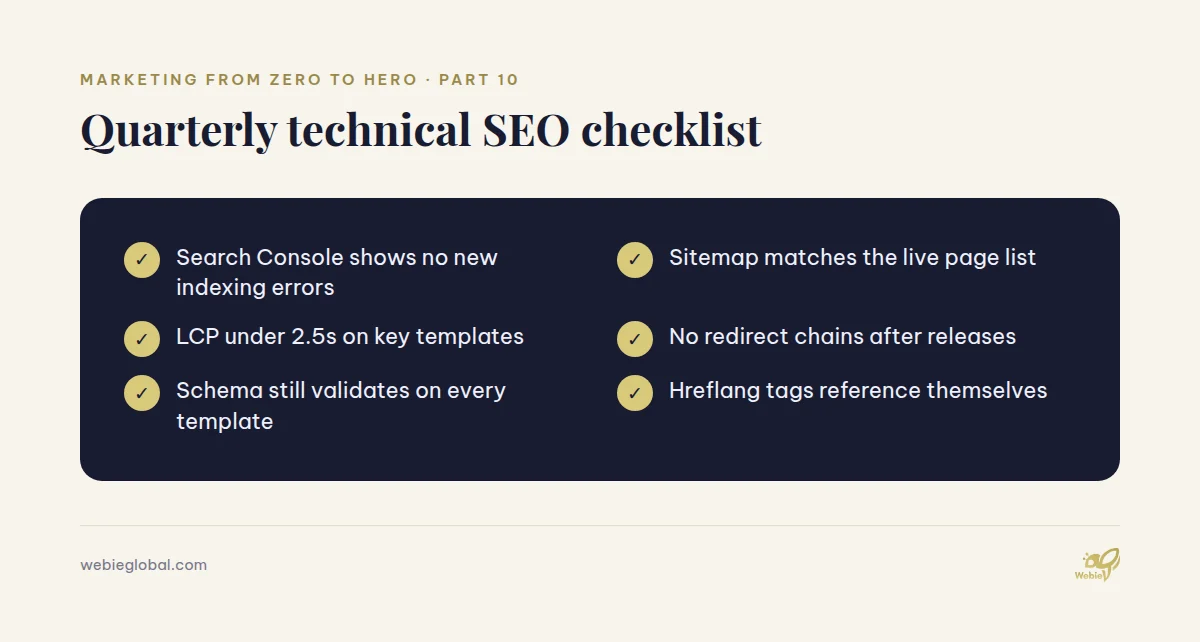
Log each run in a shared sheet, together with the date and the owner. Over a year, that log becomes the fastest way to explain a ranking change to your management team.
Common Technical SEO Mistakes on Business Websites
We audit a lot of SME sites. The same technical SEO faults appear again and again:
- Duplicate pages from filters and parameters. Set canonical tags, so one version collects the signals.
- Orphan service pages. If nothing links to a page internally, it looks unimportant.
- Thin location pages. Ten near-identical city pages help nobody, and they dilute the strong one.
- Redesigns without a redirect map. Rankings collapse overnight, although the content survives.
- Blocked JavaScript. When crawlers cannot render your components, they see an empty page.
Most of these cost a developer a day at most. Yet they routinely hold back sites whose owners are paying for content every month.
How to Prioritise Technical SEO Work on a Small Budget
You will never clear the whole backlog, so sequence it by impact instead.
| Priority | Type of issue | Typical effort |
|---|---|---|
| Now | Indexing blocks, broken redirects | Hours |
| This quarter | LCP failures, missing canonicals | Days |
| Next quarter | Schema coverage, hreflang rollout | Days |
| Ongoing | Monitoring, regression checks | Hours per quarter |
First, fix anything that hides revenue pages from search. Then improve speed on the templates that carry the most traffic. Afterwards, extend markup and internationalisation while the basics hold.
If you lack in-house engineering time, a small retained team works better than one large project. Our web and SEO services run exactly this way, with a named developer and a monthly review. That approach also pairs well with the conversion work in website as a sales asset.
FAQ
How often should we run a technical SEO audit?
Run a light technical SEO review every quarter, and a deep audit once a year. In addition, always audit after a redesign, a platform migration, or a new language launch. Those three events cause most sudden ranking losses.
Do we need a developer for technical SEO?
For diagnosis, no. A marketing lead can read Search Console, run PageSpeed Insights, and write the ticket. For implementation, yes, because technical SEO changes touch templates, redirects and server settings.
Does technical SEO help with AI search results?
It does. Clean markup, fast pages and crawlable HTML all make your content easier for AI systems to parse and cite. Therefore the same technical SEO work supports both classic rankings and answer engines.
What technical SEO tools are worth paying for?
Start free: Search Console and PageSpeed Insights cover most needs. Then add one crawler, such as Screaming Frog, once your site passes roughly 100 pages. Beyond that, buy tools only when a specific question demands them.
Can technical SEO fix low rankings on its own?
Rarely. Technical SEO removes barriers, while content and authority create the ranking. So treat it as the foundation, not the whole building.
Get a Technical SEO Review From Webie Global
Webie Global builds and maintains websites for SMEs across Europe. We handle crawling, speed, schema and hreflang as standard, alongside GDPR-aware tracking. For engagement, we work fixed-price, retainer or time-and-materials, depending on what your roadmap needs.
If you want an outside read on your site, email huyen.dang@webieglobal.com and we will run a structured review. You can also browse our services first.
Series navigation: This is Part 10 of Marketing from Zero to Hero. Previously: Website as a Sales Asset: Conversion-First Design. Next: Keyword Research for B2B: A Practical Guide.